
Alternative Casinos Similar to The Pokies
We’re honest about our platform, but we also know Aussie players like to explore. At ThePokies 111 Casino, we’ve partnered with a handful of trusted casino mates that meet our standards: fair play, fast payouts. Each partner site is vetted by our team and holds a valid Certificate of Operation. If you fancy a change of scenery or want to compare game libraries, these alternatives deliver a solid experience for Australian players.















App Download & Installation
Getting started with The Pokies Net App takes less than a minute. Since we use PWA technology, there’s no APK file to download and no dodgy third party installers. You simply visit our official website through Chrome (Android) or Safari (iOS) and add the app to your home screen. It runs lightweight, under 5 MB of storage, and loads faster than a traditional casino app.
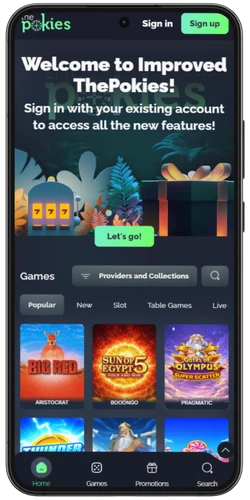
- Open Your Browser
Launch Chrome on Android or Safari on iOS and steer to the official website.
- Log In or Register
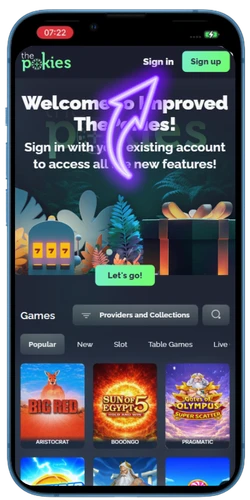
Sign into your account or create a new one. Verify your mobile number to get the 10 A$ no-deposit bonus.
- Tap “Add to Home Screen”
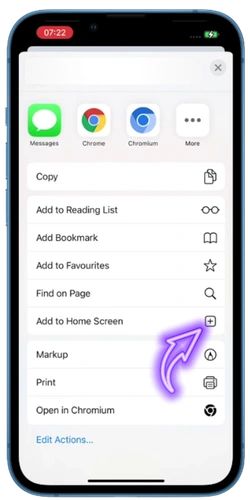
On Android: tap the three-dot menu, then select “Add to Home Screen.” On iOS: tap the Share icon, then select “Add to Home Screen.”
- Confirm the Installation
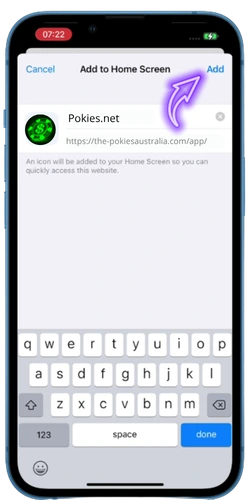
Name the shortcut “The Pokies” and tap “Add.” The app icon will appear on your home screen within seconds.
- Launch & Play
Tap the icon to open The Pokies App. Enable notifications to stay updated on daily promos, free spins, and cashback rewards.
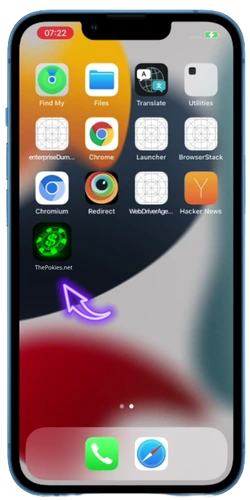
Once installed, you get push notifications for bonus drops, biometric login support, and full access to every feature accessible on desktop. Fair warning: never download any APK claiming to be The Pokies. We do not distribute standalone app files, and any such download is a scam.
Mobile Game Selection
With over 1,500 titles in the mobile library, there’s no stripped down version here. You get the full catalogue of 1,500+ titles for touchscreen play. Every game loads in portrait mode, so you can spin one handed while commuting or relaxing on the couch. The Pokies App sorts games into clear categories, making it dead easy to find exactly what you’re after.

- Video Pokies: 1,000+ titles from Pragmatic Play, NetEnt, 3 Oaks Gaming. Includes Megaways, bonus buy slots, and progressive jackpots.
- Table Games: Blackjack, Roulette, Baccarat, Poker, multiple variants of each. Touch friendly controls designed for mobile screens.
- Live Casino: Real dealers, HD streaming, real time interaction. Live Blackjack, Live Roulette, and game shows powered by Evolution.
- Crash & Instant Games: Aviator, Plinko, Mines, and more. Quick rounds, fast results, perfect for a punt during your lunch break.
- Classic Pokies: Three reel fruit machines for the old school punter. Simple mechanics, quick spins, and solid RTP rates averaging 96.3%.
All games run on HTML5 frameworks, so there’s zero need for Flash or separate plugins. The adaptive technology adjusts resolution based on your connection speed. Even if your 4G signal drops a bar,your Roulette session won’t freeze. You can also try most titles in demo mode before wagering real A$, which is a ripper way to test strategies or explore new releases risk free.
Bonuses & Promotions for App Users
Playing through the app doesn’t lock you out of any bonus. You get the same deals as desktop users, plus the convenience of claiming them with a single tap. Our promotional calendar runs seven days a week, so there’s always something on the table for Aussie players. Check out the current ThePokies 111 promo codes page for the latest active deals. Here’s what you can grab straight from your mobile:

- No Deposit Bonus: 10 A$ free upon registration and phone verification, no deposit needed to start spinning.
- First Deposit Bonus: 100% match up to 500 A$ + 50 free spins on your initial top up.
- Magical Mondays: 50% bonus up to 125 A$ on every Monday deposit.
- Triumphant Tuesdays: 60% match up to 300 A$.
- Whiz Bang Wednesdays: Choose between 35% or 70% bonus up to 350 A$.
- Exciting Thursdays: 50% reload up to 500 A$.
- Fancy Fridays: 75% bonus up to 750 A$, the biggest weekly deal.
- Stellar Saturdays: 30%, 50%, or 70% bonus up to 350 A$.
- Snazzy Sundays: 100% match on your deposits.
Every bonus activates automatically, no promo codes needed for the standard promotions. Wagering requirements apply to all promotions, so make sure you read the terms before claiming. Our cashback and loyalty program also runs excellently through the app, giving you XP points for every A$ wagered.
Payments on Mobile
Managing your bankroll through The Pokies App works just as well as on desktop. Our payment system is fully integrated into the mobile interface, so deposits and withdrawals happen without redirecting you to external pages. Australian players get access to locally relevant methods designed for speed and security.
- VISA / MasterCard: Instant deposits starting from 30 A$. Widely accepted and easy to use.
- PayID / Osko: Direct bank transfers using your phone number or email. Deposits land instantly in your casino balance.
- Cryptocurrency: Bitcoin, Ethereum, and other crypto options for players who value privacy and fast processing.
- Bank Transfer: The primary withdrawal method. Minimum cashout is 50 A$, maximum 9,000 A$ per transaction.
Account verification is required before your first cashout. You’ll need to confirm your identity once, and after that, processing typically takes between 6 and 24 hours via PayID, which is heaps faster than the 3 to 5 business days you’d wait at most other offshore casinos. All transactions are encrypted end to end, so your financial data stays safe whether you’re topping up from your CommBank app or cashing out a big win on the bus home.
Pros and Cons of Using the App
No platform is perfect, and we’d rather give you the straight truth than oversell it. The Pokies App delivers a solid mobile experience for Australian punters, but there are a few things worth knowing before you try it. Here’s an honest rundown:
| ✅ Pros | ⚠️ Cons |
| No download required, runs directly from your browser via PWA | Not accessible on Google Play |
| Under 5 MB storage, lightweight on your device | Requires a stable internet connection (no offline mode) |
| Full game library of 1,500+ titles accessible on mobile | Bank Transfer is currently the only withdrawal method |
| Biometric login (Face ID / fingerprint) for quick, secure access | Push notifications may need manual enabling on some iOS devices |
| Push notifications for bonus drops and free spin alerts | Domain may change due to mirror updates, always use official links |
| Portrait mode optimised for one-handed play | |
| PayID support for instant deposits from Australian banks | |
| Same bonuses and promotions as the desktop version |
So, the pros heavily outweigh the cons for most players. The PWA approach actually works in your favour. You avoid app store restrictions, save storage space, and always run the latest version without manual updates. For Aussie punters who value convenience and quick access, it’s a smart choice.
Customer Support
Our customer support team works around the clock so every issue gets resolved fast. You can reach us through several channels, all accessible directly from The Pokies App without switching to a desktop:
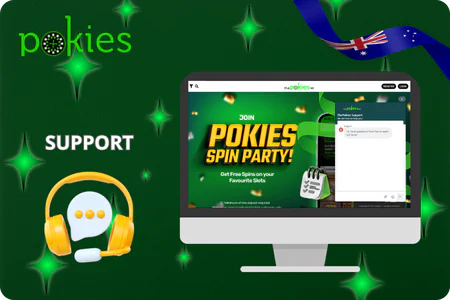
- 24/7 Live Chat: Tap the chat icon in the bottom right corner of the app. Our AI assistant handles routine queries instantly, and a human agent jumps in for anything more complex. Average wait time is under 2 minutes.
- Email Support: Send a detailed enquiry through the support section within the app. Response time is typically within 24 hours.
- In App FAQ Section: A built in knowledge base covering account verification, bonus terms, deposit and withdrawal questions, and The Pokies Net login app troubleshooting.
- Phone Verification Helpline: Dedicated assistance for SMS verification issues during registration or login recovery.
Quick answers without the runaround, that’s what Australian players deserve. Whether it’s a payment delay, a bonus query, or a technical glitch mid spin, our team is ready to sort it out so you can get back to the action.